Login - Create Account

More Preview Images

If you are a longtime Filter Forge user, you're probably sick and tired of the default lifesaver image that Filter Forge uses to preview rendered results – and so are we!

Standard Image - Lifesaver

Thankfully, Filter Forge 3.0 comes with 6 new preview images: you can choose the one that you like best:

Standard Image - Garlic

Standard Image - Kingfisher

Standard Image - Ladybug

Standard Image - Lionfish

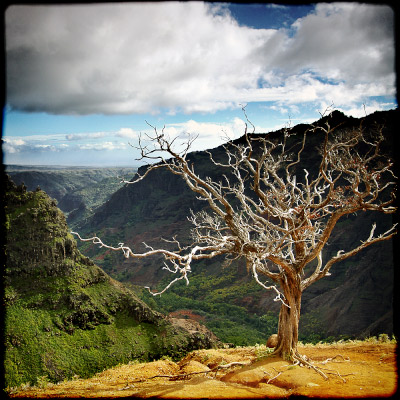
Standard Image - Tree

Standard Image - Window


Each of the built-in preview images (including the original lifesaver image) comes with an alpha channel, which lets you preview your filters on images with transparent areas:

Transparent and Non-transparent Preview Image

To load built-in preview images into the main window or the Filter Editor, do this:

Built-in Preview Images

You can also load the preview images into the new color controls (also introduced in Filter Forge 3.0) that allow loading images: click the triangle button next to the corresponding control in the filter controls area, select Built-In Preview Images and choose the image you need:

Loading the preview images into the new color controls

Bookmark and Share

Class is going REALLY well! They are loving your stuff.

(after showing Filter Forge to a class at Adobe MAX 2009)

Russell Brown
Senior Creative Director
Adobe Inc.
www.russellbrown.com

See All Testimonials

Get a 60% discount on any edition!
Only 2 Days Left!
Buy today – save up to $240!

Filter Forge is an excellent filter creation tool with a strong community spirit that will enhance your Photoshop creations.”

Nick Mead
Reviewer
en.softonic.com

“Oh my god, I've got to get into this!”

Mike Blackney
Game Artist
mikeblackney.com

Follow filterforge on Twitter